mirror of
https://github.com/ChenQihan666/MyBlog-Next.git
synced 2026-08-13 23:31:07 +08:00
 Sat Naing
e0506cb41e
Sat Naing
e0506cb41e
* feat: toggle .dark class on theme change

* feat: add callouts with rehype-callouts plugin

* docs: update blog posts with callouts
306 lines
14 KiB
Plaintext
306 lines
14 KiB
Plaintext
---
|
|
author: Sat Naing
|
|
pubDatetime: 2022-09-23T04:58:53Z
|
|
modDatetime: 2026-06-03T00:00:00.000Z
|
|
title: How to configure AstroPaper theme
|
|
slug: how-to-configure-astropaper-theme
|
|
featured: true
|
|
draft: false
|
|
tags:
|
|
- configuration
|
|
- docs
|
|
description: How you can make AstroPaper theme absolutely yours.
|
|
---
|
|
import ResponsiveTable from '@/components/ResponsiveTable.astro';
|
|
|
|
This guide covers the available configuration options in AstroPaper — from site metadata and feature flags to fonts, social links, and layout settings.
|
|
|
|
## Table of contents
|
|
|
|
## Configuring astro-paper.config.ts
|
|
|
|
All site-wide configuration lives in `astro-paper.config.ts` at the root of the project. Use `defineAstroPaperConfig()` to get full IntelliSense support:
|
|
|
|
```ts file="astro-paper.config.ts"
|
|
import { defineAstroPaperConfig } from "./src/types/config";
|
|
|
|
export default defineAstroPaperConfig({
|
|
site: {
|
|
url: "https://your-site.com/", // replace with your deployed URL
|
|
title: "AstroPaper",
|
|
description: "A minimal, responsive and SEO-friendly Astro blog theme.",
|
|
author: "Sat Naing",
|
|
profile: "https://satnaing.dev",
|
|
ogImage: "default-og.jpg",
|
|
lang: "en",
|
|
timezone: "Asia/Bangkok",
|
|
dir: "ltr",
|
|
},
|
|
posts: {
|
|
perPage: 4,
|
|
perIndex: 4,
|
|
scheduledPostMargin: 15 * 60 * 1000, // 15 minutes
|
|
},
|
|
features: {
|
|
lightAndDarkMode: true,
|
|
dynamicOgImage: true,
|
|
showArchives: true,
|
|
showBackButton: true,
|
|
editPost: {
|
|
enabled: true,
|
|
url: "https://github.com/satnaing/astro-paper/edit/main/",
|
|
},
|
|
search: "pagefind",
|
|
},
|
|
socials: [
|
|
{ name: "github", url: "https://github.com/satnaing/astro-paper" },
|
|
{ name: "x", url: "https://x.com/username" },
|
|
{ name: "linkedin", url: "https://www.linkedin.com/in/username/" },
|
|
{ name: "mail", url: "mailto:yourmail@gmail.com" },
|
|
],
|
|
shareLinks: [
|
|
{ name: "whatsapp", url: "https://wa.me/?text=" },
|
|
{ name: "facebook", url: "https://www.facebook.com/sharer.php?u=" },
|
|
{ name: "x", url: "https://x.com/intent/post?url=" },
|
|
{ name: "telegram", url: "https://t.me/share/url?url=" },
|
|
{ name: "mail", url: "mailto:?subject=See%20this%20post&body=" },
|
|
],
|
|
});
|
|
```
|
|
|
|
### `site` options
|
|
|
|
<ResponsiveTable>
|
|
|
|
| Option | Description |
|
|
| -------------------- | ---------------------------------------------------------------------------------------------------------------------------------------------- |
|
|
| `url` | Your deployed website URL. Used for canonical URLs, OG image URLs, RSS feed, and sitemap. In production this must be set correctly. |
|
|
| `title` | Your site name. |
|
|
| `description` | Your site description. Useful for SEO and social media sharing. |
|
|
| `author` | Your name. Used as the default post author. |
|
|
| `profile` | Your personal/portfolio website URL, used for structured data. Set to `undefined` if you don't have one. |
|
|
| `ogImage` | Default OG image filename in `/public` (e.g. `"default-og.jpg"`). Used when no post-specific OG image is set and `dynamicOgImage` is disabled. |
|
|
| `lang` | HTML ISO language code for `<html lang="...">`. Defaults to `"en"`. |
|
|
| `timezone` | IANA timezone for post dates (e.g. `"Asia/Bangkok"`). Ensures consistent timestamps across localhost and your deployed site. |
|
|
| `dir` | Text direction for `<html dir="...">`. Supports `"ltr"` \| `"rtl"` \| `"auto"`. |
|
|
| `googleVerification` | Google Search Console verification meta tag value. Optional. Takes precedence over the `PUBLIC_GOOGLE_SITE_VERIFICATION` environment variable. |
|
|
|
|
</ResponsiveTable>
|
|
|
|
### `posts` options
|
|
|
|
<ResponsiveTable>
|
|
|
|
| Option | Description |
|
|
| --------------------- | --------------------------------------------------------------------------------------------------------------------------------- |
|
|
| `perPage` | Number of posts shown per page on paginated listing pages. Defaults to `4`. |
|
|
| `perIndex` | Number of posts shown in the Recent section on the home page. Defaults to `4`. |
|
|
| `scheduledPostMargin` | Posts with a future `pubDatetime` within this window (in ms) are treated as published. Defaults to 15 minutes (`15 * 60 * 1000`). |
|
|
|
|
</ResponsiveTable>
|
|
|
|
### `features` options
|
|
|
|
<ResponsiveTable>
|
|
|
|
| Option | Description |
|
|
| ------------------ | --------------------------------------------------------------------------------------------------------------------------------------------------------------------------------------------------------------------------------------------- |
|
|
| `lightAndDarkMode` | Enable or disable the light/dark mode toggle. Defaults to `true`. |
|
|
| `dynamicOgImage` | Generate a dynamic OG image per post when no `ogImage` is specified in frontmatter. Defaults to `true`. See the [trade-off](https://astro-paper.pages.dev/posts/dynamic-og-image-generation-in-astropaper-blog-posts/#trade-off) for details. |
|
|
| `showArchives` | Show the `/archives` page and its header link. Defaults to `true`. |
|
|
| `showBackButton` | Show the "Go back" button on post pages. Defaults to `true`. |
|
|
| `editPost` | An "Edit page" link shown under post titles. Set `enabled: true` and provide the base `url` for your repository's edit URL. Per-post override via `hideEditPost` frontmatter. |
|
|
| `search` | Search provider. `"pagefind"` is the default. Set to `false` to disable search entirely. |
|
|
|
|
</ResponsiveTable>
|
|
|
|
## Update layout width
|
|
|
|
The default `max-width` for the entire blog is `768px` (`max-w-3xl`). If you'd like to change it, update the `max-w-app` utility in `src/styles/global.css`:
|
|
|
|
```css file="src/styles/global.css"
|
|
@utility max-w-app {
|
|
/* [!code --:1] */
|
|
@apply max-w-3xl;
|
|
/* [!code ++:1] */
|
|
@apply max-w-4xl xl:max-w-5xl;
|
|
}
|
|
```
|
|
|
|
You can explore more `max-width` values in the [Tailwind CSS docs](https://tailwindcss.com/docs/max-width).
|
|
|
|
## Configuring logo or title
|
|
|
|
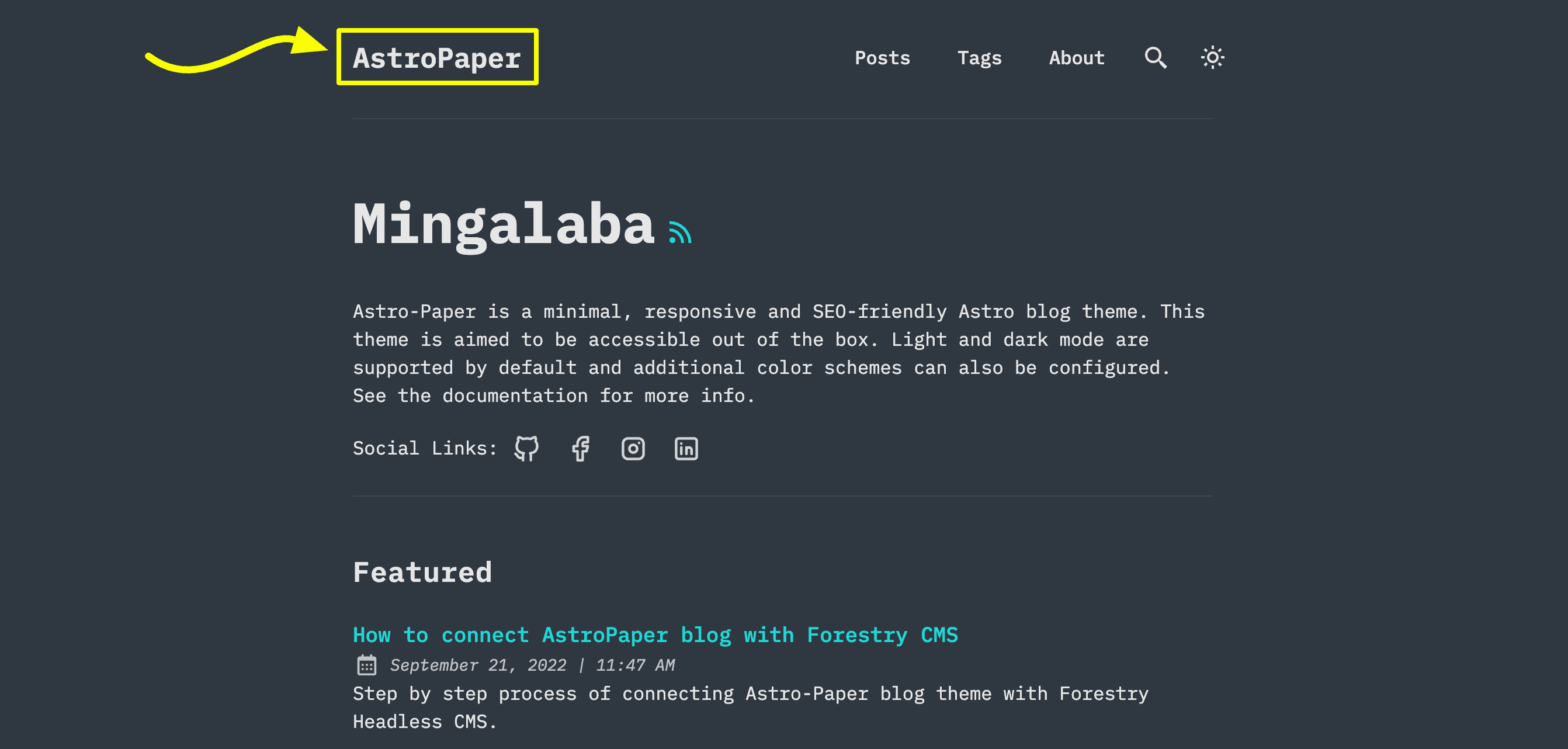
|
|
|
|
There are 3 options you can do:
|
|
|
|
### Option 1: Site title text
|
|
|
|
This is the easiest option. Update `site.title` in `astro-paper.config.ts`.
|
|
|
|
### Option 2: Astro's SVG component
|
|
|
|
You might want to use this option if you want to use an SVG logo.
|
|
|
|
- First add an SVG inside `src/assets/` directory. (e.g. `src/assets/dummy-logo.svg`)
|
|
- Then import that SVG inside `Header.astro`
|
|
|
|
```astro file="src/components/Header.astro"
|
|
---
|
|
// ...
|
|
import DummyLogo from "@/assets/dummy-logo.svg";
|
|
---
|
|
```
|
|
|
|
- Finally, replace `{config.site.title}` with imported logo.
|
|
|
|
```html
|
|
<a
|
|
href="/"
|
|
class="absolute py-1 text-left text-2xl leading-7 font-semibold whitespace-nowrap sm:static"
|
|
>
|
|
<DummyLogo class="scale-75 dark:invert" />
|
|
<!-- {config.site.title} -->
|
|
</a>
|
|
```
|
|
|
|
The best part of this approach is that you can customize your SVG styles as needed. In the example above, you can see how the SVG logo color can be inverted in dark mode.
|
|
|
|
### Option 3: Astro's Image component
|
|
|
|
If your logo is an image but not SVG, you can use Astro's Image component.
|
|
|
|
- Add your logo inside `src/assets/` directory. (e.g. `src/assets/dummy-logo.png`)
|
|
- Import `Image` and your logo in `Header.astro`
|
|
|
|
```astro file="src/components/Header.astro"
|
|
---
|
|
// ...
|
|
import { Image } from "astro:assets";
|
|
import dummyLogo from "@/assets/dummy-logo.png";
|
|
---
|
|
```
|
|
|
|
- Then, replace `{config.site.title}` with imported logo.
|
|
|
|
```html
|
|
<a
|
|
href="/"
|
|
class="absolute py-1 text-left text-2xl leading-7 font-semibold whitespace-nowrap sm:static"
|
|
>
|
|
<image src="{dummyLogo}" alt="My Blog" class="dark:invert" />
|
|
<!-- {config.site.title} -->
|
|
</a>
|
|
```
|
|
|
|
With this approach, you can still adjust your image's appearance using CSS classes. However, this might not always fit what you want. If you need to display different logo images based on light or dark mode, check how light/dark icons are handled inside the `Header.astro` component.
|
|
|
|
## Configuring social links
|
|
|
|

|
|
|
|
Social links are configured in the `socials` array inside `astro-paper.config.ts`. Each entry requires a `name` matching an SVG filename in `src/assets/icons/socials/` and a `url`:
|
|
|
|
```ts file="astro-paper.config.ts"
|
|
export default defineAstroPaperConfig({
|
|
// ...
|
|
socials: [
|
|
{ name: "github", url: "https://github.com/satnaing/astro-paper" },
|
|
{ name: "x", url: "https://x.com/username" },
|
|
{ name: "linkedin", url: "https://www.linkedin.com/in/username/" },
|
|
{ name: "mail", url: "mailto:yourmail@gmail.com" },
|
|
],
|
|
});
|
|
```
|
|
|
|
To add a social not in the defaults, add its SVG icon to `src/assets/icons/socials/` and add an entry to the array. The `name` must match the SVG filename without the `.svg` extension.
|
|
|
|
## Configuring share links
|
|
|
|

|
|
|
|
Share links are configured in the `shareLinks` array. Each entry requires a `name` (matching an SVG in `src/assets/icons/socials/`) and a base `url` to which the post URL is appended:
|
|
|
|
```ts file="astro-paper.config.ts"
|
|
export default defineAstroPaperConfig({
|
|
// ...
|
|
shareLinks: [
|
|
{ name: "whatsapp", url: "https://wa.me/?text=" },
|
|
{ name: "facebook", url: "https://www.facebook.com/sharer.php?u=" },
|
|
{ name: "x", url: "https://x.com/intent/post?url=" },
|
|
{ name: "telegram", url: "https://t.me/share/url?url=" },
|
|
{ name: "mail", url: "mailto:?subject=See%20this%20post&body=" },
|
|
],
|
|
});
|
|
```
|
|
|
|
## Configuring fonts
|
|
|
|
AstroPaper uses Astro's [fonts API](https://docs.astro.build/en/guides/fonts/) with [Google Sans Code](https://fonts.google.com/specimen/Google+Sans+Code) as the default font. This provides consistent typography across all platforms with automatic font optimizations including preloading and caching.
|
|
|
|
### Using the default font
|
|
|
|
The font is automatically configured in `astro.config.ts` and loaded in `Layout.astro`. No additional configuration is needed to use the default Google Sans Code font.
|
|
|
|
### Customizing the font
|
|
|
|
To use a different font, update three places:
|
|
|
|
1. **Update the font configuration in `astro.config.ts`:**
|
|
|
|
```ts file="astro.config.ts"
|
|
import { defineConfig, fontProviders } from "astro/config";
|
|
|
|
export default defineConfig({
|
|
// ...
|
|
fonts: [
|
|
{
|
|
name: "Your Font Name", // [!code highlight]
|
|
cssVariable: "--font-your-font", // [!code highlight]
|
|
provider: fontProviders.google(),
|
|
fallbacks: ["monospace"],
|
|
weights: [300, 400, 500, 600, 700],
|
|
styles: ["normal", "italic"],
|
|
},
|
|
],
|
|
});
|
|
```
|
|
|
|
2. **Update the Font component in `Layout.astro`:**
|
|
|
|
```astro file="src/layouts/Layout.astro"
|
|
---
|
|
import { Font } from "astro:assets";
|
|
// ...
|
|
---
|
|
|
|
<head>
|
|
<!-- ... -->
|
|
<Font
|
|
cssVariable="--font-your-font"
|
|
preload={[{ subset: "latin", weight: 400, style: "normal" }]}
|
|
/>
|
|
<!-- ... -->
|
|
</head>
|
|
```
|
|
|
|
3. **Update the CSS variable mapping in `src/styles/theme.css`:**
|
|
|
|
```css file="src/styles/theme.css"
|
|
@theme inline {
|
|
--font-app: var(--font-your-font); /* [!code highlight] */
|
|
/* ... */
|
|
}
|
|
```
|
|
|
|
The `--font-app` variable is used throughout the theme via the `font-app` Tailwind utility class, so updating this single variable applies your custom font everywhere.
|
|
|
|
> [!WARNING]
|
|
> Make sure the font name matches exactly as it appears on [Google Fonts](https://fonts.google.com). For other font providers or local fonts, refer to the [Astro Fonts documentation](https://docs.astro.build/en/guides/fonts/).
|
|
|
|
## See also
|
|
|
|
- [Customizing AstroPaper theme color schemes](https://astro-paper.pages.dev/posts/customizing-astropaper-theme-color-schemes/) — change or add color schemes via `src/styles/theme.css`.
|
|
- [Adding new posts](https://astro-paper.pages.dev/posts/adding-new-posts-in-astropaper-theme/) — frontmatter reference and file conventions.
|